Ambilight
Dynamic Ambient Lighting using Arduino
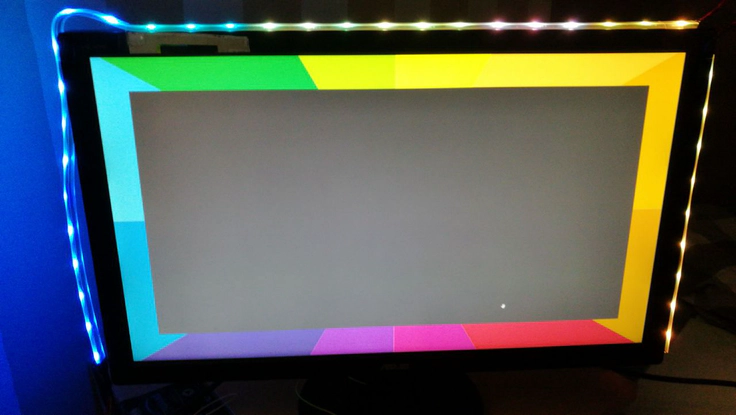 Example of an Ambilight installation with LED strips.
TLDR;
This project implements a dynamic ambient lighting solution for screens. An Arduino is used to control the LED strips based on the image content. On the desktop, screen capture is used to capture the colors at the screen edge and transmit them to the LED strips.Ambilight
TVs and Desktop screens are limited in size, and in most cases the human visual perception extends beyond the physical boundaries of the display. To enhance the viewing experience, Ambilight creates a more immersive environment by projecting colors from the screen onto the surrounding walls. This technology is patented by Philips and thus not openly available for use in other products. However with a couple of addressable RGB LED strips and an Arduino, a similar effect can be achieved.
Collection the Colors
For this to work, the colors at the screen edges need to be captured and sent to the LED strips. Ideally, one would capture the image data directly from the video signal, but that would require splitting and decoding the video stream, which in modern systems would be HDMI or DP, so it’s beyond the scope of a toy project. Instead we implemented a desktop application to capture the screen content and extract the relevant color information.
Lighting the LED Strips
Once the color information is extracted, it needs to be sent to the LED strips. This is done using the Arduino, which receives the color data via USB and controls the LED strips accordingly. Since the Arduino has dedicated USART hardware for serial communication, it can handle the data transfer efficiently without blocking the main program. Also there are libraries available that simplify the process of controlling LED strips, such as Adafruit’s NeoPixel library. The Arduino code listens for incoming data and updates the LED colors in real-time, creating a seamless ambient lighting effect that matches the on-screen content.
Configuration
To support different sized displays, the desktop application allows users to configure the number of LEDs and their positions relative to the screen in a GUI. The application then calculates the appropriate color mapping and sends the configuration data to the Arduino for processing. Additional settings, like choosing counter-clockwise or clockwise LED strip arrangement, or avoiding black bars in 21:9 content can also be adjusted.
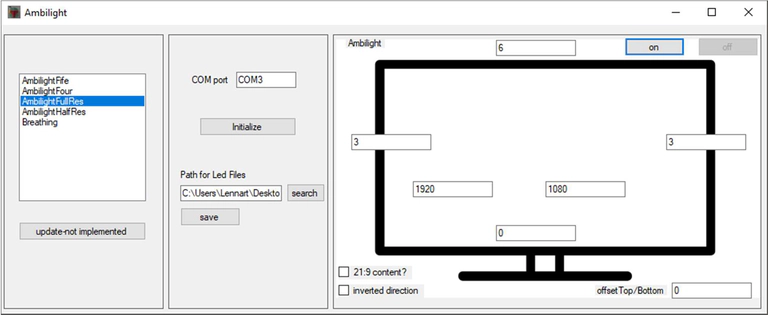 Main application window of Ambilight showing the LED strip configuration.
Features
- Real-time color extraction from the screen
- USB communication with Arduino for LED control
- Configurable LED strip layout and settings
- Support for various screen sizes and aspect ratios
- Support for 21:9 content with blackbars
- Selectable color profiles for different lighting environments
- Selectable COM port for Arduino connection
Limitations
- The system relies on screen capture, which may introduce latency or inaccuracies in color representation.
- Limited baud rate of the arduino serial interface leads to low refresh rates.
- Requires a desktop application to capture the screen content, so it does not work on TVs or consoles.